Very interesting device for the gadget minded ...
Whilst it mentions that it uses an iPhone App it does not say there is an equivalent Android App. I am sure one will be "in the works" if not already available.
Belkin's WeMo lets you wirelessly control any plugged-in product at home:
 Belkin has introduced a new home automation product called WeMo which allows you to turn home appliances and electronics on or off wirelessly from anywhere. WeMo is a large wall plug adaptor with a built-in wi-fi connection that allows users to turn the device plugged into it on or off. For example, a person can plug in their lamp to the WeMo Home Automation Switch and then switch it on or off using the accompanying free WeMo iPhone app.
Of interest to those considering Windows RT ...
What applications are available on Windows RT?: Tony McSherry looks at the desktop applications available on the Windows RT Surface tablet.
And so the Windows 8 confusion continues ...
I have been saying this for months - although unaware of the Twitter confusion with ReTweet (RT)! The whole Windows 8 marketing must be coming from the same group that came up with Outlook Express on Windows XP, Windows Mail on Windows Vista and Live Mail on Windows 7. Just to add to the confusion with Outlook in MS Office and the recent decision to rename Microsoft Hotmail (originally MSN Hotmail or later Windows Live Hotmail) to Outlook.com! Confused yet??
Windows RT branding will be too confusing, Dell exec predicted: 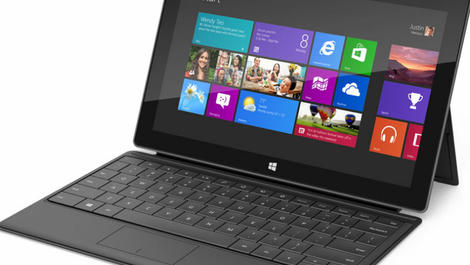 Between Windows 8, Windows Phone 8 and Windows RT, it seems Microsoft has released too many disparate versions of Windows for consumers to keep track of - just as an executive at Dell reportedly predicted would occur. Dell vice chairman and president of Global Operations and End User Computing Solutions Jeff Clarke told The Australian Financial Review that he at one point urged Microsoft to change the name of the Windows RT operating system used on ARM-based tablets like Microsoft's Surface. A Windows device should be compatible with all Windows applications, Clarke argued, but Windows RT tablets are not. Thus, the mobile OS should not carry the "Windows" moniker. But Microsoft CEO Steve Ballmer reportedly told Clarke that the Windows brand was just too important to drop.
Windows RT Confusion on Twitter
There's little doubt that Clarke's prediction has come true - Microsoft has even reportedly had to relax its own return policies due to customers' confusion over the various versions of Windows. Twitter users have been sounding off as well: "I keep wondering what Windows is retweeting," wrote CIO Online editor Brian Eastwood on Monday, referring to the tendency to abbreviate retweet as "RT" on Twitter. Another user, Corey Ginnivan, echoed that sentiment last Wednesday, tweeting, "I can never tell if your [sic] telling me to Retweet or if you're talking about the Surface." There isn't even a simple way to determine which Windows apps will work on Windows RT devices when you're browsing the Windows app store from a non-RT device.
When queried repeatedly by one Twitter user last Thursday, Microsoft's official @Surface account replied that the only way to see which apps are Windows RT-compatible is to check each individual app's "details" tab to make sure that ARM is listed as a supported processor.
A future for Windows RT
Microsoft even launched a dedicated site to explain the difference between the Surface with Windows RT and the Windows 8 Surface model, but that seems to have done little to alleviate Windows users' confusion. Nevertheless, Dell Vice President of Consumer Marketing Neil Hand insisted to The Australian Financial Review that "there's a future for RT." "Making sure we educate the market place on the differences was going to be a necessary action no matter what," he said. "Just calling it something different is not going to solve the problem."
A very good step by step guide ...
But should all these Windows 8 add-on menus be necessary? Why couldn't Microsoft make all these options configurable for those who did not want change for change's sake!
Add a Shutdown menu to the Windows 8 desktop: Greg Shultz has found a technique that will allow you to recreate a reasonable facsimile of the Shutdown pop-up menu on Windows 8's desktop.
For all those still enjoying Windows XP ...
I think this is a fair comment on the current situation.
Windows XP's retirement is in doubt, say some experts: Some security researchers wonder if Microsoft will indeed retire Windows XP on April 8, 2014.
A good summary ...
In Depth: Highs and lows for Google in 2012:
It's been an interesting year for Google. Android stormed the smartphone charts but didn't do so well in tablets, so Google stepped in and made arguably the best non-Apple tablets around. Google's given huge sums to charity while avoiding huge amounts of UK tax, and when Apple booted its Maps off iOS it was Apple, not Google, that ended up getting hurt.
Might be worth a look when it is becomes available ...
For those who need some assistance with the new Windows 8 user interface.
Having trouble learning Windows 8? There’s an Aussie answer for that:  With a heavy emphasis on touch and rectangles, Windows 8 isn’t like your traditional mouse based operating system, and that makes learning it a little harder. Thankfully, there’s a homegrown solution coming designed to make everything easier to understand. Previewed recently for GadgetGuy, the educational program is developed by Dynamic Learning Online, a company that has been creating interactive training for quite some time, and has previously worked with the government to bring a series of interactive tutorials to Australians, educating seniors on how to use computers. For that project, over 20,000 senior citizens across Australia took part, with over 153,000 lessons taken over the course of two years.
Staggering growth in Smartphones continues ...
A smartphone has to be the most comprehensive computing device available. An increasingly powerful computer combined with a phone and all packed into a very portable device!
More than half of Australians now using smartphones:
 More than half (52 per cent) of Australian mobile users are now using smartphones according to the Telstra Smartphone Index – up from 41 per cent in 2011 and 32 per cent in 2010. The research, conducted by the Neilsen Company on behalf of Telstra, shows one big growth area is mobile shopping. Half of smartphone users have used their device to research a purchase and three in four of these have gone ahead and bought the product offline.
So it is finally available in the shops ...
A 32 GB version starts at $559.
Microsoft's Surface tablet goes on sale at JB Hi-FI and Harvey Norman:
 Microsoft has announced its exciting new Surface tablet will finally go on sale through Australian retailers by mid December after initially being offered online. Surface runs the Windows RT operating system – a light version of Windows 8 – and is available in 32GB and 64GB capacities. JB Hi-Fi and Harvey Norman will stock the device before Christmas to give customers a chance to touch and feel the product before they buy.
